
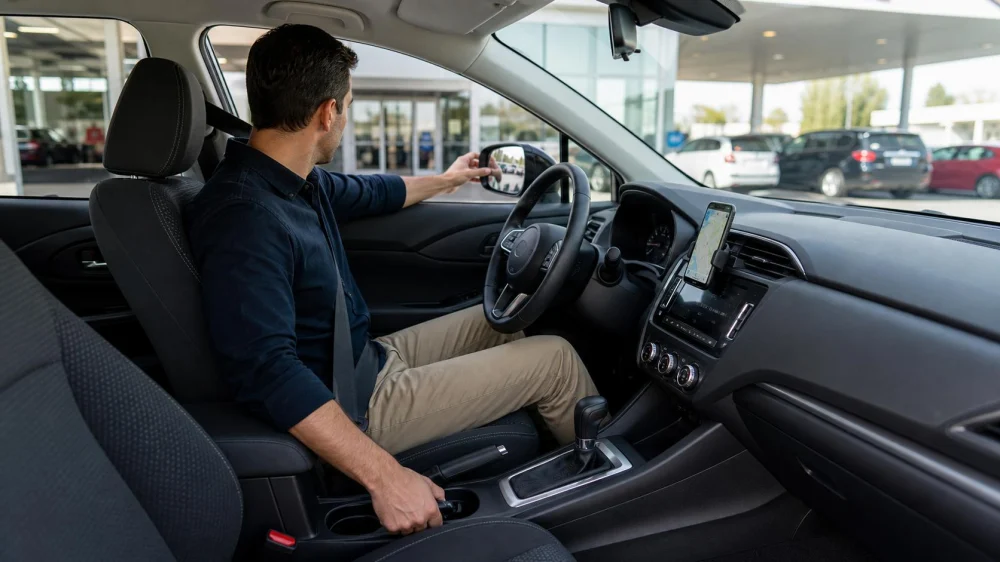
Rental Car Driver Setup: Adjust Seat, Mirrors, Controls, and View
Table of contents
Quick answer
Before leaving the rental space, park securely and adjust the seat, head restraint, steering wheel, mirrors, and seat belt for the authorized driver. Clear windows and confirm the view. Locate lights, wipers, defogger, hazard switch, parking brake, gear selector, fuel gauge, and turn signals. Pair navigation only while parked, enter the route, and take a slow first loop before joining fast traffic.
A-1 Rent a Car Cash
Culver CityLos Angeles CountyCalifornia
10620 Venice Blvd., Culver City, CA 90232, USA
Park before adjusting
Complete setup with the vehicle stationary in a safe legal space. Put the transmission in Park or the proper secured position, set the parking brake when instructed, and keep your foot on the brake as appropriate. Do not learn a touchscreen or move the seat in traffic.
Walk around the vehicle first and document existing damage according to the rental process. Check tires, windows, mirrors, lights, license plates, and roof clearance. Confirm doors, trunk, fuel door, and charging port close properly.
Remove loose items from the driver's footwell and seat tracks. A bottle, floor mat, bag, or cable can interfere with pedals or adjustment. Store luggage so it does not block rear vision or become a projectile.
Every authorized driver should perform an individual setup. Do not assume the previous driver's position fits. Save a memory setting only if you understand the system and do not overwrite a provider setting against instructions.
National Car Rental
LatrobeWestmoreland CountyPennsylvania
148 Aviation Ln Ste 311, Latrobe, PA 15650, USA
Set seat and wheel
Adjust distance so you can fully operate brake and accelerator without stretching or locking the knee. Keep the back supported and sit high enough for a clear road view while preserving headroom. Use the owner's manual for controls and limitations.
Set the seatback so arms remain slightly bent while hands reach the wheel. Avoid an excessively reclined position that changes belt fit and control. Adjust steering-wheel tilt and reach only while parked, then lock it.
Position the head restraint according to vehicle guidance so it supports the head appropriately. It is not a pillow for the neck. If the restraint or seat will not adjust, ask the rental company for assistance or another vehicle.
Fasten the seat belt and check that the lap portion lies low and the shoulder belt crosses the chest without being placed behind the back or under the arm. Use height adjustment when available. Child restraints require separate installation and vehicle instructions.
Set mirrors and view
Center the interior rearview mirror on the rear window from the normal driving posture. Adjust side mirrors to reduce overlap and improve adjacent-lane coverage. Mirror methods vary; use the owner's manual and a safe technique you understand.
Mirrors do not eliminate blind spots. Turn your head and scan according to safe-driving practice before changing lanes. Camera and blind-spot systems are aids, not substitutes for direct observation.
Clean inside and outside glass with approved materials. Remove stickers or hanging items only with rental-company permission. Confirm windshield wipers sit correctly and washer fluid sprays without obstructing the view.
Locate front and rear defoggers and climate controls. Practice activating them while parked. If a mirror, camera, sensor, wiper, or defogger is damaged or cannot provide an adequate view, report it and request correction before driving.
Learn essential controls
Identify the gear selector, start and stop control, parking brake, lights, high beams, turn signals, wipers, washers, hazards, horn, window controls, locks, and fuel or charge display. Hybrid and electric vehicles may be silent when ready, so confirm the dashboard indicator.
Check the exact fuel or charging requirement in the agreement and at the vehicle. Do not assume color or connector type. Locate the release and ask how return charging or refueling is measured.
Set navigation and audio before moving. Delete previous destinations only under the rental privacy process, and avoid signing into personal accounts if unnecessary. Mount a phone only where lawful and where it does not block vision or airbags.
Disable or adjust unfamiliar driver-assistance features only if the rental company and manual permit and you understand the effect. Learn cruise control, lane assistance, parking sensors, regenerative braking, and one-pedal features before relying on them.
Take a safe first drive
Choose a low-speed route inside the facility or nearby streets. Test brake feel, accelerator response, steering, turning radius, indicators, and visibility. Listen for warning tones and watch dashboard messages.
Allow extra following distance while adapting. Vehicle size, brake response, and blind spots differ. Avoid a freeway, narrow garage, mountain road, or severe weather until essential controls feel familiar.
Stop safely if a warning light, poor visibility, unusual noise, steering problem, brake concern, or unfamiliar behavior appears. Contact the rental provider or roadside service. Do not keep driving merely to avoid a delay.
When switching drivers, park and repeat the setup. Confirm that the person is authorized by the rental agreement. An unauthorized driver can create contract and coverage problems.
Limitations
This guide cannot replace the vehicle owner's manual, rental agreement, driving law, driver training, or individualized accessibility assessment. Models and controls vary widely.
Do not drive if you cannot achieve safe control, vision, belt fit, or understanding of essential systems. Request another vehicle or qualified assistance.
Sources and evidence
NHTSA materials emphasize adjusting the driver's seat and mirrors before driving and maintaining adequate view and control. FTC rental-car guidance recommends reading the agreement, confirming fees and authorized drivers, and understanding roadside assistance and coverage.
- NHTSA driver wellness and vehicle setup toolkit
- NHTSA guidance on driver position and mirrors
- FTC consumer guide to renting a car
Frequently asked questions
Can I adjust the seat while driving?
No. Stop and park safely before changing seat, wheel, mirror, navigation, or unfamiliar settings.
Should side mirrors show the car body?
Mirror-setting methods differ. Use the manual and a method that reduces blind areas while preserving orientation, then still check blind spots directly.
What if I cannot reach the pedals comfortably?
Do not improvise with loose cushions or pedal devices. Ask the rental company about a different vehicle or approved adaptive equipment.
Can I rely on the backup camera?
No. Check mirrors and surroundings directly. Cameras can be dirty, distorted, delayed, or unable to show every hazard.
Why does the car seem silent after starting?
Hybrid and electric vehicles may be ready without engine noise. Check the ready indicator and manual before selecting a gear.
When should I exchange the vehicle?
Request help when controls, visibility, warnings, fit, or mechanical behavior prevent confident safe operation. Document and report the issue before continuing.
Conclusion
A rental car should feel familiar before it moves into traffic. Park, clear the cabin, fit the seat and belt, set mirrors, locate essential controls, and program the route. Test the vehicle slowly and stop for any safety concern. Repeating the setup for each authorized driver costs minutes and can prevent confusion during the part of the trip that demands full attention.
 Enterprise Rent-A-Car4.0 (146 reviews)
 Enterprise Rent-A-Car4.0 (168 reviews)
 Enterprise Rent-A-Car4.0 (158 reviews)
 Dollar Car Rental1.0 (6 reviews)
 Avis Car Rental3.0 (84 reviews)
 Studinovski Exotics4.0 (61 reviews)
 Best Time of the Year to Find Cheap Rental Cars in the United States
 How to Rent a Car for a Road Trip Along Route 66 | LifeStar Car Rental
 Car Rental Safety Tips for Stress-Free Long Highway Drives
 The Truth About Unlimited Mileage Car Rentals in the U.S.
 Understanding the Fine Print: Rental Car Contracts Explained Simply
 How to Pack Light for a Road Trip in a Compact Rental Car