
Rental Car Return Checklist: Privacy, Fuel, and Proof
On this page
Quick answer
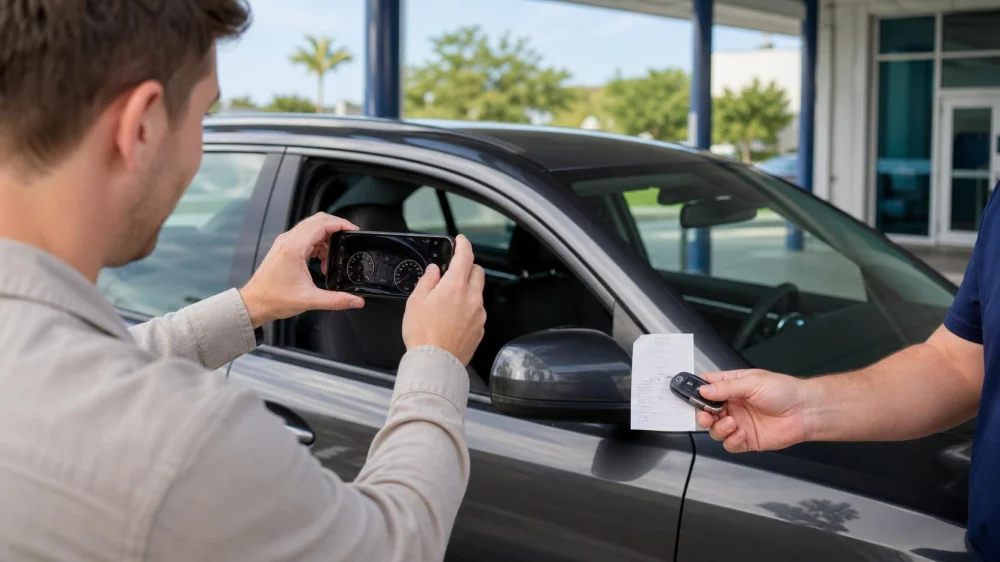
Before returning a rental car, verify the location, deadline, fuel level, mileage terms, and after-hours instructions. Remove belongings and delete paired phones, contacts, messages, destinations, garage codes, and app access. Photograph the exterior, interior, odometer, fuel gauge, parking location, and key handoff. Keep fuel and return receipts, then compare the final charge with the agreement.
Return documentation is a time-linked record showing where, when, and in what apparent condition a renter delivered the vehicle and keys.

Review the return terms
- Confirm the exact branch and return entrance—not merely the airport address.
- Check the contractual deadline, grace-period language, and early-return terms.
- Verify the required fuel level and whether a receipt is requested.
- Review mileage, toll, equipment, and key requirements.
- Call ahead if the branch may be closed or plans have changed.
Obtain written confirmation for an extension or location change. Do not assume an app update amended the agreement until the company confirms it.

Payless Car Rental
PhiladelphiaPhiladelphia CountyPennsylvania
6975 Norwitch Dr, Philadelphia, PA 19153, USA
Remove personal data
- Unpair every phone and remove saved Bluetooth devices.
- Delete contacts, call history, messages, media accounts, and downloaded data.
- Clear navigation history, saved destinations, favorites, and home/work addresses.
- Sign out of connected apps and remove digital keys or vehicle access from your phone.
- Erase garage-door, gate, and remote-control programming.
- Use the vehicle's guest-data or factory-reset option only after confirming it will not interfere with required vehicle functions.
Check USB ports, wireless charging areas, seat pockets, glove box, console, trunk, and under seats for devices and documents. A reset is useful only if completed; verify that your accounts and destinations no longer appear.
Confirm fuel and mileage
Refuel according to the written policy, not a remembered general rule. Keep the station receipt showing date, time, location, and amount. Photograph the gauge and odometer after refueling and again at the return point. If the gauge does not update or a charging/fuel issue occurs, contact the branch before leaving the vehicle.
For electric rentals, follow the agreement's battery-return level and charging rules. Charging networks, idle fees, cables, and reimbursement policies vary by company and location.
Document vehicle condition
- Park safely in good light where possible.
- Photograph all sides, wheels, glass, roof when safely visible, and interior.
- Capture dashboard warnings, fuel, odometer, and cleanliness.
- Record returned accessories: keys, charging cable, toll device, child seat, or other equipment.
- Take a short continuous walk-around video without entering traffic or restricted areas.
Photos are supporting records, not a guarantee against a charge. Report new damage, a collision, mechanical problems, spills, or missing equipment through the contract's procedure rather than concealing it.
Complete the handoff
For staffed returns, request an inspection and return receipt. Review the recorded fuel, mileage, time, and condition before leaving. For after-hours returns, follow the exact parking and key-drop instructions, photograph the location and key deposit when permitted, and note the time. Never leave keys in an unsecured place based on an unofficial message.
Keep the agreement, reservation, fuel receipt, toll information, condition photos, return confirmation, and final invoice together until all charges settle and any issue is resolved.
Review the final receipt
- Compare rental dates, rate, mileage, fuel, taxes, tolls, options, and equipment with the agreement.
- Distinguish a pending card authorization from a posted charge.
- Contact the rental company promptly about a discrepancy and provide concise records.
- Keep case numbers, names, dates, and written responses.
- If unresolved, review card-dispute deadlines and contact appropriate consumer authorities.
Important limits
This is general consumer guidance, not legal, insurance, privacy, or financial advice. Company contracts, state law, airport procedures, card holds, toll billing, and connected-car systems vary. Follow the current signed agreement and official branch instructions.
After a crash or safety problem, prioritize people, contact emergency services when needed, and follow legal and rental-company reporting requirements. Do not delay required reporting to create photographs.
Frequently asked questions
Should I factory-reset the infotainment system?
Use the documented guest-data removal or reset process when appropriate, then verify your information is gone. Do not alter fleet or safety settings.
What if the branch is closed?
Follow the agreement's after-hours procedure exactly. Document parking and key return, and understand when responsibility for the vehicle ends under the contract.
How long should I keep photos?
Keep them with the agreement and receipts until the final charge is settled and any contractual claim or dispute window relevant to you has passed.
Is a fuel receipt necessary?
It may be required by some terms and can support your record. Keep it whenever you refuel near return.
What if I left an item behind?
Contact the return branch or the company's lost-property channel immediately with the vehicle, rental, item, and contact details. Do not attempt unauthorized vehicle access.
Sources and evidence notes
The Federal Trade Commission's rental car guidance explains that connected vehicles can retain contacts, messages, phone numbers, and navigation destinations, and advises deleting personal data before return. It also recommends reviewing fuel, mileage, toll, early/late return, and other fee terms when comparing and completing rentals.
Next steps
Save this checklist before the return day, allow extra time, and create one folder for the agreement, photos, receipts, and final invoice. Use LifeStar Car Rental to explore providers, but verify the selected company's current return and privacy procedures directly. A careful return closes both the vehicle handoff and the digital trail.



 My Ride LLC5.0 (16 reviews)
 Enterprise Rent-A-Car3.0 (155 reviews)
 Hertz Car Rental - Portland - Portland International Jetport (MAINE) (Pwm)3.0 (297 reviews)
 Rodeo Exotic Car Rentals5.0 (17 reviews)
 VSSR Exotic Car and Supercar Rentals Las Vegas4.0 (90 reviews)
 Delaware Turo LLC.1.0 (6 reviews)
 How to Spot Honest Rental Car Companies vs Hidden Fee Traps
 Car Rental Tips for Booking During Independence Day Weekend
 How to Avoid Paying for “Free” Upgrades That Actually Cost More in Hidden Fees
 Car Rental Policies for Hurricane Season Travel in Florida: What You Need to Know
 How to Rent a Car for a Road Trip Through the Midwest
 What to Expect When Renting a Car for an Out-of-Town Wedding