
Rental Car Infotainment Privacy: Pair Less and Delete Data
On this page
Quick answer
A rental car’s infotainment system can retain paired-phone names, contacts, call or message logs, and navigation destinations. Connect only when needed, deny unnecessary permissions, and prefer a power-only adapter when charging. Before return, remove your device, clear personal destinations and profiles, sign out of apps, and confirm your phone no longer treats the vehicle as a trusted connection.

Decide whether to connect
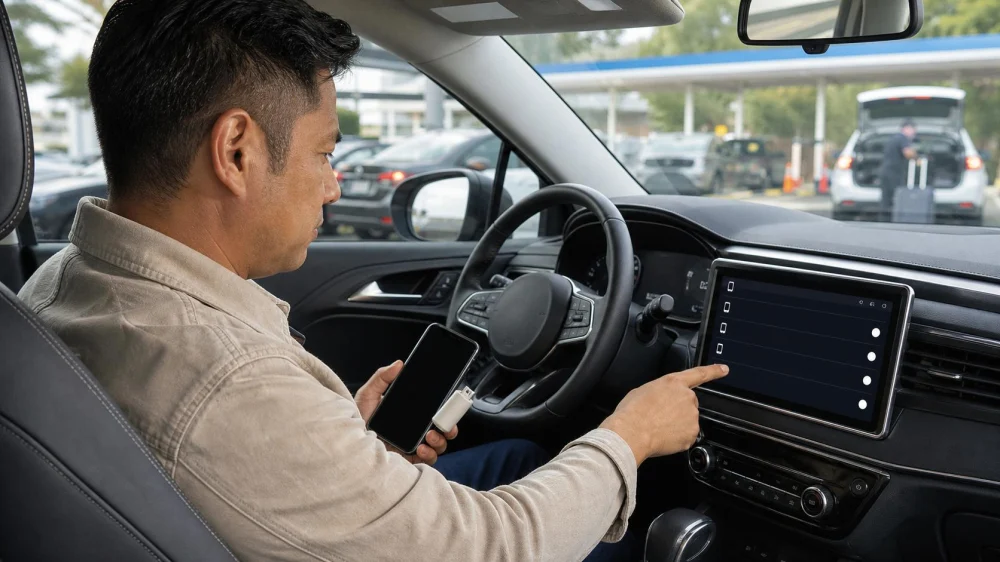
First decide which function you need: charging, audio, hands-free calls, navigation projection, or full account integration. If you only need power, a compatible adapter that does not create a data connection can reduce exposure. Some vehicle USB ports may initiate data access, so do not assume every cable is power-only.
Inspect the paired-device list before adding your phone. Seeing earlier renters’ device names is a reminder that the vehicle may retain data, but do not open or copy their information. Note the vehicle’s current user profile and ask the rental company before performing a factory reset that could remove fleet configuration.

Limit permissions
When pairing, the phone or car may request access to contacts, recent calls, messages, notifications, calendar, or media. Grant only what supports your use. Streaming audio usually does not require an address book. Hands-free calling may need contacts, but you can decline and dial from the phone only when safely parked.
Use a temporary guest profile if the car offers one. Avoid naming the device with your full name, company, or phone number. Disable automatic reconnection when the trip ends. If multiple drivers connect, each person should manage their own permissions and remove their own data rather than sharing one account.
Protect destinations and accounts
Built-in navigation can save home, work, recent destinations, favourite locations, and route history. Use generic nearby meeting points when practical and avoid saving “Home.” Smartphone projection may show app notifications on the dashboard, so adjust preview settings before passengers or parking attendants use the vehicle.
Do not sign into the car with a permanent email, music, video, shopping, or vehicle-maker account unless necessary. If you do, use a temporary session where available and record which apps need sign-out. Never save payment cards or passwords in a rental vehicle.
Delete data before return
Park safely with enough time before the return deadline. In the infotainment settings, find connected devices and delete your phone. Clear call history, contacts, messages, navigation recents, favourites, user profiles, garage-door data, hotspot credentials, and app sessions that belong to you. Menu names vary by vehicle.
Use the owner’s manual stored in the vehicle or an official manufacturer guide when needed. Do not drive while navigating settings. A factory reset may clear all users but can also remove rental-company preferences, so ask before using it. Photograph only the final generic device list if you need proof, without capturing others’ information.
Verify without damaging settings
Turn the system off and on while parked, then check that your device name, profile, recent destinations, and accounts are absent. Disconnect the cable and disable the car’s Bluetooth or Wi-Fi connection from your phone. A visible deletion is helpful but cannot prove how backend or telematics data is retained.
Ask the rental provider about its privacy and connected-vehicle policies when data sensitivity matters. Fleet systems can collect vehicle location, mileage, fuel, diagnostics, or driving events independently of your phone pairing. The rental agreement and provider notice should explain collection and use.
Check your phone afterward
On your phone, forget the vehicle’s Bluetooth connection, remove its Wi-Fi network, and review app permissions granted during pairing. Revoke connected-car access where the phone operating system provides it. Check whether a projection app saved the vehicle and whether future automatic launch remains enabled.
If you returned the car before deleting data, contact the rental company promptly with the agreement number and vehicle details. Ask whether staff can clear the profile and document the request. Change passwords when you signed into an account and cannot confirm sign-out, especially if payment or private messages were accessible.
Frequently asked questions
Does unplugging the phone delete car data?
No. Pairing and history can remain after disconnection. Remove the device and personal records through the vehicle settings, then forget the vehicle on the phone.
Is Bluetooth safer than USB?
Each can transfer data depending on permissions and system design. The safer choice is the minimum connection and access needed for your task.
Should I factory-reset every rental car?
Not without permission. A reset can erase fleet settings or other configuration. Delete your device, profiles, destinations, and sessions, and ask the provider if a broader reset is appropriate.
Sources and limitations
The U.S. Federal Trade Commission’s rental car consumer guidance explains that infotainment systems may retain contacts, call and message logs, phone numbers, and destinations; it recommends limiting permissions, avoiding data-capable charging when unnecessary, and deleting paired data before return. Vehicle and provider systems vary, and local privacy rights may differ.
Conclusion and next steps
Connect only for a defined purpose, deny extra access, and avoid storing personal destinations or permanent accounts. Add data deletion to the return checklist before fuel, mileage, and receipt review. Finish by forgetting the car on your phone and contacting the provider quickly if you missed a step.





 Go Rentals5.0 (2 reviews)
 Enterprise Rent-A-Car4.0 (237 reviews)
 Enterprise Rent-A-Car4.0 (100 reviews)
 SIXT Rent a Car Chicago South Loop4.0 (701 reviews)
 Hertz Car Rental - Glendale - West Glendale Avenue2.0 (284 reviews)
 Uber Car Rentals by Hertz2.0 (170 reviews)
 How to Use Membership Clubs & Hidden Promo Codes for Lower Rental Car Rates
 Best Car Rental Options for Business Travelers in the US – Top Choices for Convenience and Comfort
 What Happens When You Return a Rental Car Late: Fees & Tips
 What Happens When You Get Into a Minor Accident With a Rental Car
 Understanding Car Rental Policies for Holiday Weekend Price Surges
 Best Rental Car Options for Uber and Lyft Drivers