
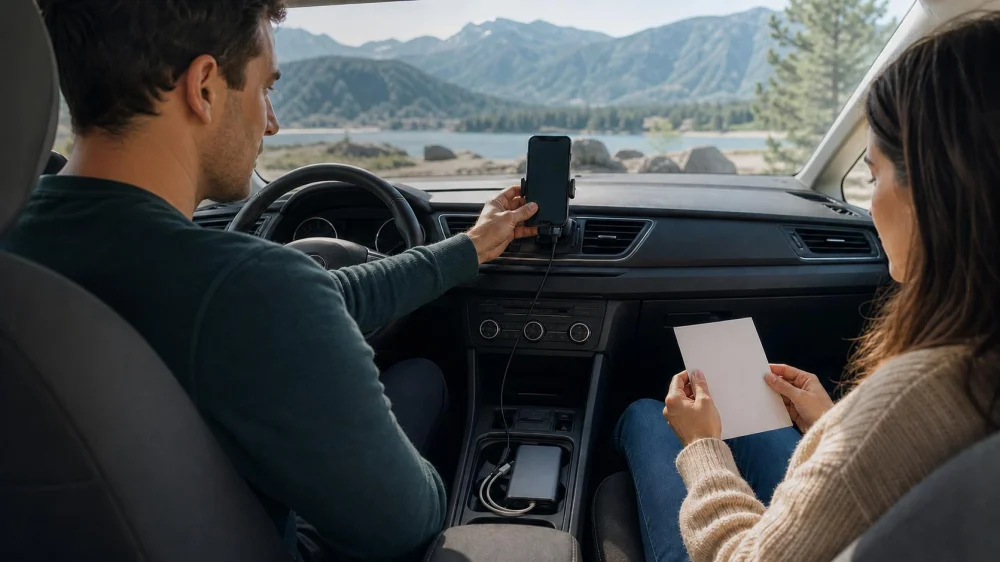
Rental Car Navigation Backup: Mount, Maps, and Charging
Table of contents
Quick answer: Build a rental car navigation plan before driving: save the destination and key stops, download offline maps, carry a short written route, pack a compatible mount, cable, and power bank, and assign navigation to a passenger when possible. Install and test everything while legally parked without blocking the windshield, airbags, controls, or vents. If a route needs attention, pull over safely instead of operating the phone in motion.

DriveProFleet & Turo Host - NYC Rental Cars
Union CityHudson CountyNew Jersey
210 Paterson Plank Rd, Union City, NJ 07087, USA
Prepare routes before pickup
Save the exact return entrance, lodging, first fuel or charging stop, parking, and emergency contacts. Add terminal, street side, floor, or after-hours gate instead of trusting a pin alone.
Check for weak coverage, closures, tolls, vehicle restrictions, ferries, borders, or unsuitable roads. Verify conditions with current official and rental-company sources.
Do not assume the car has navigation, phone integration, the expected connector, or working power. Bring an adaptable, nonpermanent setup.

Set up the device only while parked
Set up in a legal parking space. Adjust seat and mirrors first, then place the phone without blocking the road. Check current local mount rules.
Do not cover gauges, warnings, cameras, controls, vents, airbags, passenger space, or view. Avoid reaching across the wheel. Remove unstable or marking mounts.
Set destination, route, audio, and do-not-disturb while parked. NHTSA includes navigation adjustment among distractions; see its distracted driving guidance. Hands-free prompts still require attention.
Build offline and paper backups
Download the route plus detours and test it without cellular service. Offline maps may omit traffic, closures, toll changes, or hours, so they are continuity tools, not live truth.
Write highway numbers, major interchanges, direction, destination, return branch, and a safe help point. A passenger can use it when the phone fails.
Save addresses and contacts offline. Screenshot return instructions, but keep reservation codes, room numbers, and personal data private.
Plan charging without loose-cable hazards
Bring a short cable and appropriate adapters. Never force a plug or use damaged, loose, hot, or wet outlets.
Keep cable away from pedals, steering, controls, seat tracks, and exits. Secure excess and the power bank, protect them from heat, and follow instructions.
Navigation, bright screens, weak cellular signal, heat, and wireless connections can drain a phone. Start with a charged device and reserve enough power for calls, rental support, roadside assistance, and return documentation.
Protect accounts and erase trip data
Prefer the phone and mount over signing into an unfamiliar built-in system when practical. If you pair by Bluetooth or cable, review prompts before sharing contacts, messages, calendars, or other data. Grant only the access needed for navigation or audio.
At return, delete the paired phone, recent destinations, home and work addresses, favorites, call history, messages, and app sessions from the vehicle. Confirm removal from both the car and phone. A factory reset may alter vehicle settings, so use the rental company's approved deletion process rather than resetting the entire system.
Know what to do when navigation fails
If the mount falls, the phone overheats, charging stops, directions conflict, or the route changes unexpectedly, continue driving safely and follow road signs until a legal stopping place is available. Do not catch a falling device or troubleshoot it in motion.
Once parked, compare the offline map, route card, current signs, and official road information. Call the rental company when the route could violate vehicle restrictions, cross a border, enter a closed road, or affect return. Ask a passenger to navigate, but the driver remains responsible for safe decisions and signs.
Frequently asked questions
Can I hold the phone for navigation?
Handheld-use laws vary, and holding a device adds distraction. Set up a lawful secure mount while parked and avoid interaction while driving.
Is the rental car's built-in navigation safer?
Any system can distract when adjusted in motion. Learn it while parked, keep prompts simple, and stop safely for changes.
Can I attach a mount with adhesive?
Avoid permanent or residue-producing attachments unless the rental company approves them. Use a stable removable option that complies with law and instructions.
What if GPS sends me to a closed road?
Obey signs and barriers, continue to a safe stopping place, then verify an alternate route with official current information.
Next steps
Save key destinations, download offline coverage, make a short route card, and pack a removable mount, short cable, and charged power bank. At pickup, inspect ports and install the setup while parked. During the trip, stop for every adjustment. Before return, remove the mount and cable, delete paired data and destinations, and photograph the clean dashboard.




 Avis Car Rental3.0 (79 reviews)
 Exclusive Ambullete Services2.0 (26 reviews)
 Gold Chrome Car Rentals4.0 (10 reviews)
 Enterprise Rent-A-Car4.0 (578 reviews)
 Rent a Car Tours4.0 (13 reviews)
 Econo-Car Hackettstown0.0 (0 reviews)
 Best Apps to Book Cheap Car Rentals in the United States
 10 Rental Car Scams You Should Be Aware of in the U.S.
 Rental Car Fuel Type Check: Prevent Misfueling
 How to Avoid Hidden Mileage Charges When Renting a Car
 How to Save Money on Airport Car Rentals in Miami: Expert Tips
 Best Road Trip Routes in the U.S. Perfect for Rental Cars | LifeStar Car Rental