
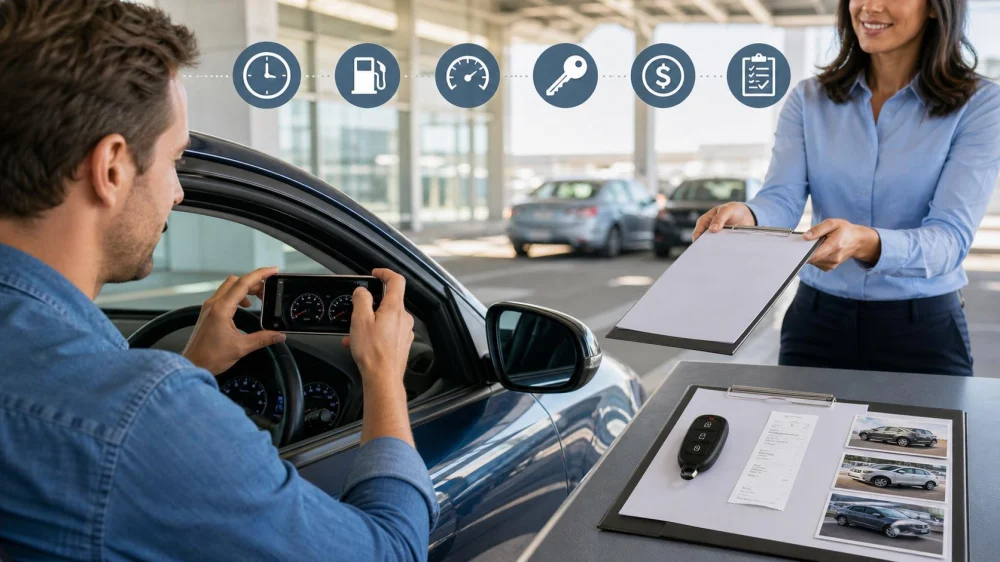
Rental Car Return Receipt: Check Time, Fuel, and Charges
On this page
- Collect proof before return
- Confirm the return location and time
- Record fuel or charge level
- Photograph mileage and condition
- Complete the key handoff
- Review the return time and place
- Compare rate, days, and mileage
- Check fees, taxes, and extras
- Understand pending and final charges
- Dispute an error with evidence
- Return receipt checklist
A rental car return receipt closes the recorded part of the trip: where and when the vehicle was returned, mileage, fuel or battery level, rate, taxes, extras, and current charges. It may be a preliminary receipt if tolls, fuel, damage review, tickets, or other items post later.
Review the receipt before deleting photos or discarding the rental agreement. A small error in time, location, fuel, vehicle, or rate can affect several charges. Keep the evidence until the final card statement, deposit release, tolls, and any post-rental notices are settled.
Create one trip folder before pickup and add every document as it arrives. Use filenames with the rental number and date but avoid exposing identity or card details in a shared cloud folder. Save screenshots as well as links because reservation and receipt pages may later change.
If a company employee inspects the car with you, listen to each recorded observation and ask for a copy before leaving. Do not sign a blank condition form. A normal return acknowledgment and an admission of responsibility for disputed damage are not the same document.

Rides Exotics
Los AngelesLos Angeles CountyCalifornia
23013 Ventura Blvd, Woodland Hills, CA 91364, USA
Collect proof before return
Use the active agreement to verify the return address, entrance, operating hours, grace period, fuel or charging requirement, mileage allowance, and after-hours process. Save navigation instructions because large airports and city facilities can have several rental zones.
Keep the last fuel or charging receipt, toll information, approved extension, upgrade record, and messages about vehicle issues. Use date-stamped photos where practical. Do not photograph other customers, employees without permission, or private documents.

MAVERICK AUTO RENTALS
GlendaleLos Angeles CountyCalifornia
1521 W Glenoaks Blvd, Glendale, CA 91201, USA
Confirm the return location and time
Arrive at the contracted location with enough time to find the lane, unload, refuel if required, and complete inspection. Returning to another branch can trigger relocation or one-way charges even when it carries the same brand.
If traffic or a travel disruption threatens the deadline, contact the provider before the return time and obtain written approval for any change. A phone call does not change the contract unless the active rental record is updated.
Record fuel or charge level
Photograph the dashboard fuel gauge or battery percentage with the vehicle safely parked and fully on in the normal display mode. Include mileage and relevant range only if visible. Keep the nearby fueling or charging receipt showing date, location, quantity, and amount.
Follow the exact contract: same level, full tank, prepaid fuel, or specified EV percentage. Range estimates fluctuate and may not substitute for state of charge. Do not overfill a fuel tank or leave an EV connected contrary to facility instructions.
Photograph mileage and condition
In a safe well-lit area, capture all sides, wheels, glass, roof if visible from the ground, interior, cargo area, fuel door, charging port, and any existing or new mark. Take a wide context photo showing the vehicle in the return lane.
Remove belongings and trash before final photos. Do not climb, enter traffic, or block operations for documentation. Report damage, warning lights, lost items, or mechanical concerns honestly under the provider's process.
Complete the key handoff
Give every key, fob, card, charging adapter, toll device, and removable accessory to the authorized employee or designated after-hours box. Follow the posted process and do not leave keys on a counter or in an unlocked vehicle unless instructed.
Obtain a time-stamped return confirmation. For unattended return, photograph the approved parking position and secure key deposit without exposing access codes. Note the box or lane used and retain the contract's after-hours terms.
Review the return time and place
Check the receipt's branch, return date, clock time, time zone, and rental duration. A few minutes can create another rental day or late fee under some rate rules. Compare the recorded time with your handoff proof.
For an after-hours drop, the system may close the contract when staff processes the vehicle, not when you parked it. Verify the agreement's rule and preserve evidence of the actual drop time. Contact the branch promptly if the receipt uses the wrong time.
Compare rate, days, and mileage
Match the vehicle number, class, base daily or weekly rate, number of charged days, approved extension, included mileage, starting odometer, ending odometer, and excess-mile charge. An upgrade should match the agreed price.
Weekly rates, grace periods, and extensions do not always prorate intuitively. Ask for a line-by-line explanation rather than calculating from the advertised daily rate alone. Keep the original reservation and signed pickup contract.
Check fees, taxes, and extras
Review additional drivers, young-driver fees, child seats, navigation, roadside products, protection options, one-way charges, airport fees, facility charges, taxes, fuel service, EV charging, cleaning, smoking, pet, and late-return items.
Confirm that declined extras are not present and returned equipment is credited. Some tolls and violations arrive later through another statement. Ask which administrator will bill them and what service fee applies.
Understand pending and final charges
A payment card may show an authorization hold larger than the final rental. The provider releases its hold, while the bank controls posting time. Ask for the final charge and release confirmation, then contact the bank if timing exceeds its stated process.
Do not assume the first emailed receipt is final. Check for language about open damage review, fuel verification, tolls, or after-hours processing. Save later corrected receipts and compare the actual card statement.
Dispute an error with evidence
Contact the return branch or official customer service with the rental number, incorrect line, requested correction, agreement, receipt, photos, fuel proof, and relevant messages. Keep the case number, representative, date, and promised response time.
Be specific: wrong return time, duplicate additional-driver fee, incorrect fuel level, unreturned equipment charge, or another item. Escalate through the provider, card issuer, insurer, or applicable consumer process as appropriate. Preserve originals and submit copies through secure channels.
Return receipt checklist
Verify vehicle, branch, date, time, mileage, fuel or charge, rate, days, extension, extras, taxes, one-way fee, equipment return, key handoff, deposit or hold, toll process, and final balance. Keep photos and receipts.
A clean return receipt depends on evidence collected before walking away. Matching time, location, fuel, mileage, condition, and keys to the contract makes later review straightforward. Keep the full file until every delayed charge and card authorization has reached a final state.



 SIXT Rent a Car Beverly Hills4.0 (638 reviews)
 To The Point Transport4.0 (16 reviews)
 City Ride Car Rental5.0 (9 reviews)
 Budget Car Rental4.0 (36 reviews)
 EZ Leasing Cars2.0 (115 reviews)
 Avis Car Rental4.0 (200 reviews)
 The Future of Car Rentals: Autonomous Cars, EV Fleets & What It Means for You
 Car Rental Policies for Refunds After Early Drop-Off
 Long-Term Car Rental in the US: Everything You Need to Know
 How to Choose the Best Rental Car for a Ski Resort Vacation in the U.S.
 What Happens When You Return a Rental Car Without a Receipt
 How to Rent a Car for a Botanical Garden Day Trip With Fragile Plants